
Documentation Index

Fetch the complete documentation index at: https://liquidai-fix-android-sdk-qa-issues.mintlify.app/llms.txt

Use this file to discover all available pages before exploring further.

View Source Code

Browse the complete example on GitHub
This example demonstrates how to use LeapSDK for single-turn generation tasks on Android. The SloganApp generates creative product slogans on-device using local language models, showcasing how to integrate AI capabilities for specific product needs without requiring cloud connectivity. Built with traditional Android Views, this example provides a different UI approach compared to Jetpack Compose, making it ideal for teams working with legacy Android codebases.

What’s inside?

The SloganApp showcases:
  • Single-turn Generation - Generate creative output without maintaining conversation context
  • Traditional Android Views UI - Implementation using XML layouts and View-based architecture
  • On-device Processing - Complete privacy with local model inference
  • Simple Integration - Minimal setup for focused AI tasks
  • Product-focused Prompting - Optimized prompts for marketing and slogan generation
This example is perfect for understanding how to integrate LeapSDK into existing Android applications that use the traditional View system rather than Jetpack Compose.

Environment setup

Before running this example, ensure you have the following:
Download and install Android Studio (latest stable version recommended).Make sure you have:
  • Android SDK installed
  • An Android device or emulator configured
  • USB debugging enabled (for physical devices)
This example requires:
  • Minimum SDK: API 31 (Android 12)
  • Target SDK: API 36
  • Kotlin: 2.3.0 or higher
Add the LeapSDK to your app-level build.gradle.kts:
dependencies {
    implementation("ai.liquid.leap:leap-sdk:0.10.6")
    implementation("ai.liquid.leap:leap-model-downloader:0.10.6")

    // Android UI components
    implementation("androidx.appcompat:appcompat:1.6.1")
    implementation("com.google.android.material:material:1.11.0")
    implementation("androidx.constraintlayout:constraintlayout:2.1.4")
}

How to run it

Follow these steps to generate product slogans:
  1. Clone the repository
    git clone https://github.com/Liquid4All/LeapSDK-Examples.git
    cd LeapSDK-Examples/Android/SloganApp
    
  2. Open in Android Studio
    • Launch Android Studio
    • Select “Open an existing project”
    • Navigate to the SloganApp folder and open it
  3. Gradle sync
    • Wait for Gradle to sync all dependencies
    • Resolve any dependency conflicts if prompted
  4. Run the app
    • Connect your Android device or start an emulator
    • Click “Run” or press Shift + F10
    • Select your target device
  5. Generate slogans
    • Enter a product name or description in the input field
    • Tap the “Generate Slogan” button
    • Watch as the AI creates creative marketing copy on-device
    • Generate multiple variations by tapping again

Usage examples

Try generating slogans for different products: Example 1: Technology Product
Input: "Wireless noise-cancelling headphones"
Output: "Silence the world. Amplify your music."
Example 2: Food Product
Input: "Organic cold-pressed juice"
Output: "Nature's energy, bottled fresh daily."
Example 3: Service Business
Input: "On-demand dog walking service"
Output: "Happy paws, on your schedule."
Example 4: Software Product
Input: "AI-powered photo editing app"
Output: "Your photos, brilliantly reimagined."
Each generation produces unique slogans tailored to your product description, perfect for brainstorming marketing campaigns.

Understanding the architecture

Traditional Android Views Approach

Unlike examples that use Jetpack Compose, SloganApp demonstrates integration with the traditional Android View system: XML Layout Structure:
<!-- activity_main.xml -->
<LinearLayout>
    <EditText
        android:id="@+id/productInput"
        android:hint="Enter product name or description" />

    <Button
        android:id="@+id/generateButton"
        android:text="Generate Slogan" />

    <TextView
        android:id="@+id/sloganOutput"
        android:textStyle="italic" />
</LinearLayout>
Activity Implementation:
import ai.liquid.leap.GenerationOptions
import ai.liquid.leap.ModelRunner
import ai.liquid.leap.message.ChatMessage
import ai.liquid.leap.message.MessageResponse
import ai.liquid.leap.downloader.LeapModelDownloader
import kotlinx.coroutines.MainScope
import kotlinx.coroutines.flow.collect
import kotlinx.coroutines.flow.onEach
import kotlinx.coroutines.launch

class MainActivity : AppCompatActivity() {
    private val mainScope = MainScope()
    private val downloader by lazy { LeapModelDownloader(applicationContext) }
    private var runner: ModelRunner? = null

    override fun onCreate(savedInstanceState: Bundle?) {
        super.onCreate(savedInstanceState)
        setContentView(R.layout.activity_main)

        mainScope.launch {
            runner = downloader.loadModel(
                modelName = "LFM2-1.2B",
                quantizationType = "Q5_K_M",
            )
            generateButton.isEnabled = true
        }

        generateButton.setOnClickListener {
            val product = productInput.text.toString()
            generateSlogan(product)
        }
    }

    private fun generateSlogan(product: String) {
        val runner = runner ?: return
        val prompt = """
            Create a compelling, memorable slogan for: $product
            Make it concise, catchy, and professional.
        """.trimIndent()

        sloganOutput.text = ""
        mainScope.launch {
            val conversation = runner.createConversation()
            val options = GenerationOptions.build {
                temperature = 0.3f
                minP = 0.15f
                repetitionPenalty = 1.05f
            }
            conversation.generateResponse(ChatMessage(ChatMessage.Role.USER, prompt), options)
                .onEach { resp ->
                    if (resp is MessageResponse.Chunk) {
                        sloganOutput.append(resp.text)
                    }
                }
                .collect()
        }
    }
}

Single-turn Generation Pattern

This example demonstrates single-turn generation, where:
  • Each request is independent (no conversation history) — a fresh Conversation is created per request
  • The streamed MessageResponse.Chunk values are appended to the UI as they arrive
  • No need to manage conversation state or context across requests
  • Ideal for focused tasks like slogan generation, summarization, or classification
This pattern is simpler than multi-turn conversations and perfect for specific use cases where context isn’t needed.

Model Selection

The app uses LFM2-1.2B (Q5_K_M), a lightweight model that balances:
  • Speed - Fast generation for responsive UI
  • Quality - Creative and coherent slogans
  • Size - ~700 MB on disk; comfortably fits in mobile RAM
  • Efficiency - Lower memory and battery consumption than larger checkpoints
For higher-quality outputs, swap the modelName / quantizationType arguments to a larger checkpoint from the LEAP Model Library.

Results

The SloganApp provides instant slogan generation directly on your Android device: SloganApp Screenshot The interface shows:
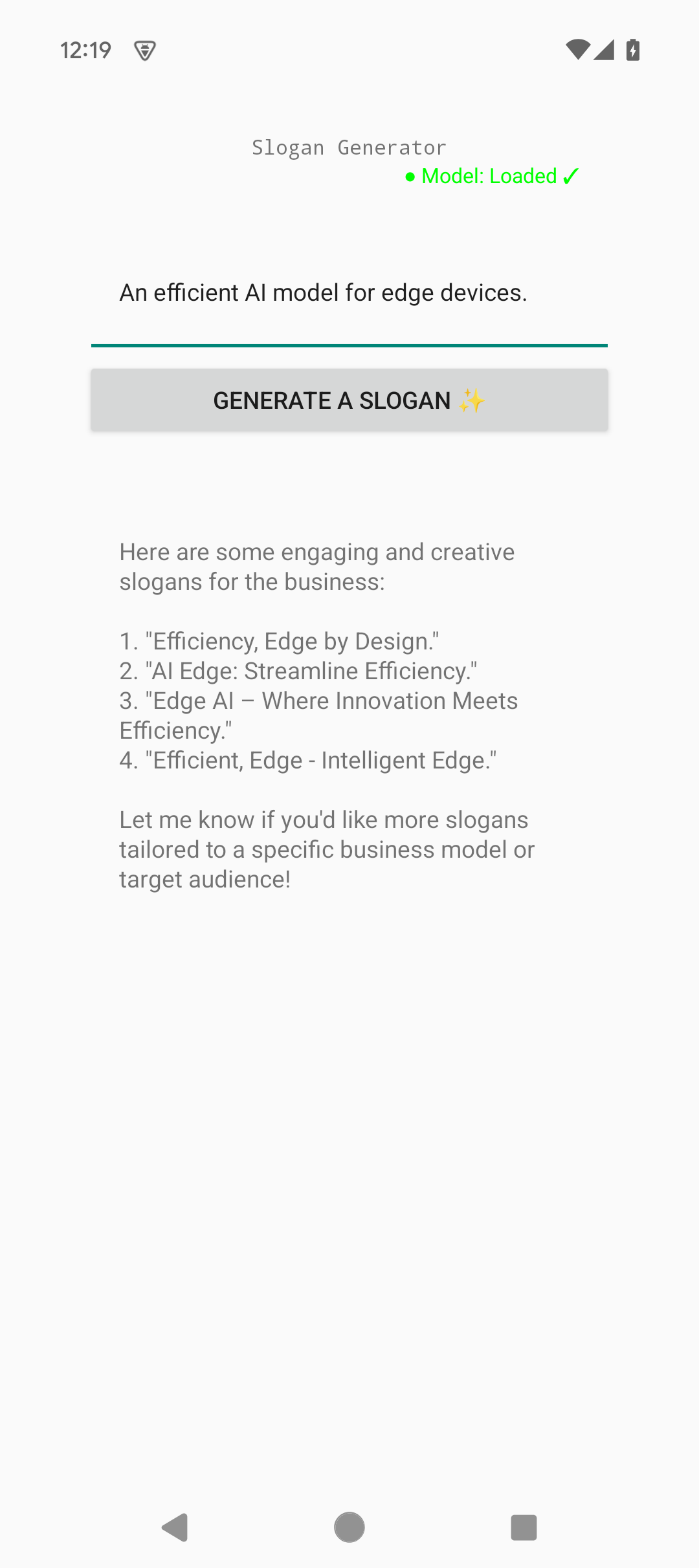
  • Clean, simple UI with Material Design components
  • Instant feedback with loading states during generation
  • Generated slogans displayed with italic styling for emphasis
  • Ability to regenerate for multiple creative options
All processing happens on-device, ensuring complete privacy for your product ideas and marketing concepts.

Further improvements

Here are some ways to extend this example:
  • Multiple variations - Generate 3-5 slogan options at once for comparison
  • Style selection - Let users choose tone (professional, playful, luxury, etc.)
  • Length control - Add options for short taglines vs. longer slogans
  • History tracking - Save generated slogans with timestamps and product names
  • Share functionality - Export slogans via Android’s share intent
  • Copy to clipboard - One-tap copy for easy paste into marketing materials
  • Language support - Generate slogans in multiple languages
  • Industry templates - Pre-configured prompts for different industries (tech, food, fashion)
  • A/B testing mode - Compare multiple AI-generated options side-by-side

Need help?

Join our Discord

Connect with the community and ask questions about this example.